
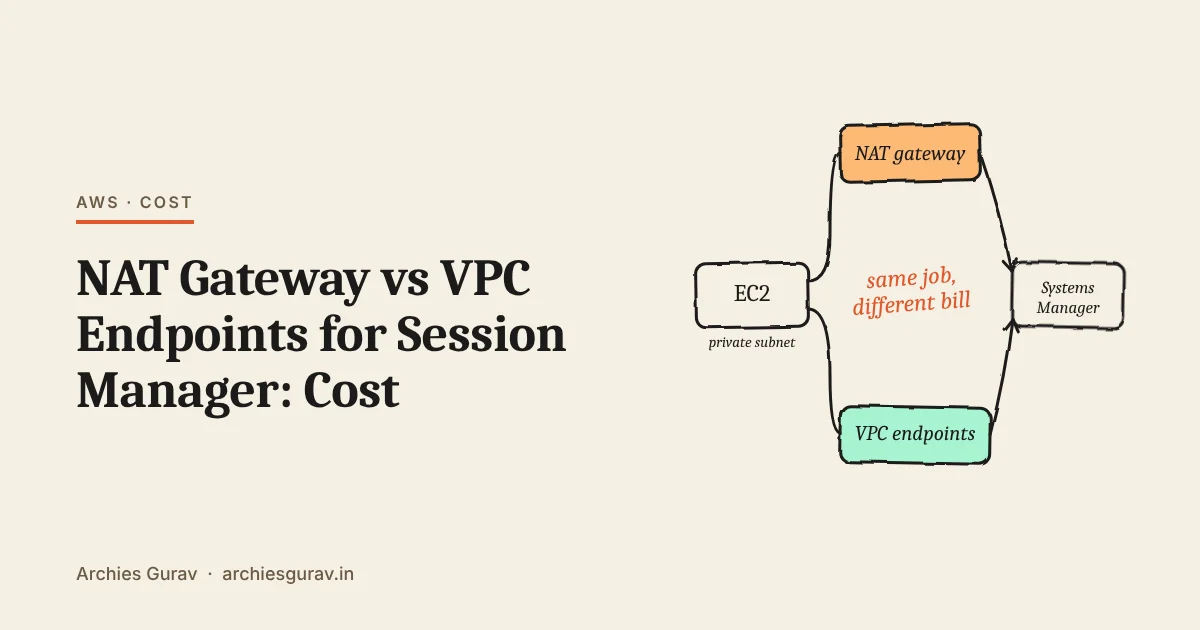
NAT gateway vs VPC endpoints comes down to one question: does your server need the internet? If yes, use a NAT gateway, and Session Manager works through it for free. If no, use VPC endpoints and skip the NAT gateway. That’s the whole decision, and the rest of this guide shows why it holds and what each option costs.
Needs the internet: NAT gateway. Only talks to AWS: VPC endpoints. Uses S3: add the free S3 gateway endpoint either way.
NAT gateway vs VPC endpoints, as an office building
Picture your private subnet as a locked office. The servers inside can’t leave on their own, because they have no public IP address. To reach anything outside, including Systems Manager for Session Manager, they need a way out.
There are two ways out:
- A NAT gateway is the front door to the street. Through it, your servers can go anywhere in the city: package mirrors, payment APIs, and AWS services too. You pay rent for the door every hour, plus a fee for everything carried through it.
- VPC endpoints are private corridors to specific AWS buildings. Each corridor leads to one service, such as Systems Manager. Your servers can only go where a corridor goes, and each corridor has its own hourly rent. The corridor to S3 is free.
Now the rule makes sense on its own:
- If your servers go out into the city anyway, you already pay for the front door. Systems Manager is just one more stop through that door. Building corridors to it would be paying twice.
- If your servers never go into the city, don’t rent a front door at all. Build corridors only to the AWS services they use. It’s cheaper, and with no door to the street, data can’t easily walk out.
Three common cases
| Your servers | Use | Why |
|---|---|---|
| Web or API servers that install updates or call outside APIs | NAT gateway | You need it anyway, and Session Manager costs nothing extra through it |
| Servers that only talk to AWS, like a batch job reading from S3 | VPC endpoints | Cheaper than NAT, and no route to the internet at all |
| Rules say traffic to AWS must stay private | Both | Endpoints for AWS services, NAT for everything else |
Which VPC endpoints Session Manager needs
For Session Manager without a NAT gateway, AWS lists three interface endpoints:
| Endpoint | What it's for |
|---|---|
ssm | The main Systems Manager service |
ssmmessages | The session channel, which carries your shell |
ec2messages | Messages between the agent and Systems Manager |
Newer agents, version 3.3.40.0 and later, use ssmmessages instead of ec2messages when they can. AWS still lists all three, so create all three to be safe.
Two optional endpoints are worth knowing about:
logs, if you save session logs to CloudWatch Logs.kms, if you encrypt sessions with a KMS key.
Each one adds to the bill, so add them only if you use those features.
NAT gateway vs VPC endpoint cost
These are AWS’s published prices for us-east-1, from the VPC pricing and PrivateLink pricing pages: $0.045 an hour for a NAT gateway and $0.01 an hour for each interface endpoint in each zone, which works out to these monthly amounts. Most other regions are similar or a little higher.
| Item | Per month | Data processed |
|---|---|---|
| NAT gateway | About $32.85 | $0.045 per GB |
| Interface endpoint, per zone | About $7.30 | $0.01 per GB |
| S3 gateway endpoint | Free | Free |
The catch with interface endpoints is that you pay for each endpoint in each Availability Zone. Three endpoints in two zones means six charges.
Session Manager sends very little data, so the hourly charges are almost the whole bill. Here’s what that adds up to:
| Setup | NAT gateway | 3 interface endpoints |
|---|---|---|
| One Availability Zone | About $32.85 | About $21.90 |
| Two Availability Zones | About $65.70, with one NAT gateway per zone | About $43.80 |
| You already have NAT for other traffic | $0 extra | $21.90 to $43.80 extra |
So the numbers back up the office picture. Corridors are cheaper than front doors, but only when they replace a door. Next to a door you already have, they’re an extra bill.
If you go with endpoints, remember to add one for every AWS service the servers use, not just Session Manager. A server that also reads secrets needs a Secrets Manager endpoint, for example, at about $7.30 a month per zone.
Best practices for NAT gateways and VPC endpoints
- Always add the S3 gateway endpoint. It’s free, the SSM Agent uses S3 for its updates, and every S3 download it carries stops costing NAT data charges.
- Turn on private DNS for each interface endpoint. The agent then reaches the endpoint with no configuration change on the server.
- Allow port 443 to the endpoints. Give them a security group that accepts HTTPS from your servers’ security group, and nothing else.
- Put endpoints only in zones that have servers. Every extra zone is another charge per endpoint.
- Count all your VPCs. Endpoints are per VPC. With separate VPCs for dev and prod, you pay for each.
- Check your actual bill. In Cost Explorer, filter by usage types that contain
NatGatewayandVpcEndpointto see what you’re really paying for.
Frequently asked questions
Does Session Manager need a NAT gateway?
No. Session Manager needs a route from the server to Systems Manager. A NAT gateway gives one, and so do the ssm, ssmmessages and ec2messages interface endpoints.
Which is cheaper, a NAT gateway or VPC endpoints?
It depends. Three interface endpoints cost about $21.90 a month in one zone, less than one NAT gateway at about $32.85. But if you already need a NAT gateway for internet access, endpoints are an extra cost on top.
Are VPC gateway endpoints free?
Yes. The S3 and DynamoDB gateway endpoints have no hourly or data charge. Interface endpoints, the kind Session Manager uses, are charged per hour, per zone.
Do I need the ec2messages endpoint?
Agents from version 3.3.40.0 use ssmmessages instead when they can, but AWS still lists ec2messages as part of the setup. Creating it costs about $7.30 a month per zone and avoids connection problems with older agents.
Can I use both a NAT gateway and VPC endpoints?
Yes. Traffic to services with an endpoint goes through the endpoint, and everything else goes through the NAT gateway. That’s common when security rules need private access to AWS services but the servers still need the internet.
Conclusion
Remember the office: a NAT gateway is the front door to the street, and VPC endpoints are private corridors to AWS. If your servers need the street, use the door you already pay for. If they don’t, build only the corridors they need. And take the free corridor to S3 either way.
My book Production AWS with Terraform builds the network for a production setup in Terraform, including private subnets, the NAT gateway and the S3 gateway endpoint, and sets up Session Manager access to the servers.
Free resource
AWS Cost Checklist for Small Teams
Where AWS bills usually leak, and the checks that keep yours predictable: compute, data transfer, NAT, storage and alerts.
Get it free