
A scalable AWS architecture does not have to be complicated. One of the platforms I design and manage runs for a financial services company whose traffic is calm most of the time and then jumps sharply when a marketing campaign goes out: an SMS blast, a launch announcement, a social push. The platform has to stay fast during those spikes, stay secure because it carries a financial brand, and stay affordable the rest of the month.
In this post I walk through the architecture I built for it, the reasoning behind each layer, and the trade-offs I made deliberately. Client details are left out; the design is what matters, and you can reuse it for any web application with spiky traffic.
Put CloudFront and AWS WAF in front, let only CloudFront reach a load balancer, run the application servers in private subnets with Auto Scaling, keep the database and cache in their own private subnet, and remove SSH entirely. The setup comfortably handles 3,000 to 4,000 concurrent users, and Auto Scaling adds servers when traffic goes beyond that.
What the platform needed
Before choosing any AWS service, I wrote down what the platform actually had to do:
- Absorb sudden traffic spikes without slowing down, then scale back so the bill does not stay high.
- Look and behave like a financial brand: HTTPS everywhere, a web application firewall, no server reachable from the internet, and secrets kept out of code.
- Keep running costs predictable, because most of the month the traffic is modest.
- Stay simple to operate, so routine work such as deployments, patching and scaling does not need a large team.
Those four requirements shaped every decision below.
The scalable AWS architecture at a glance
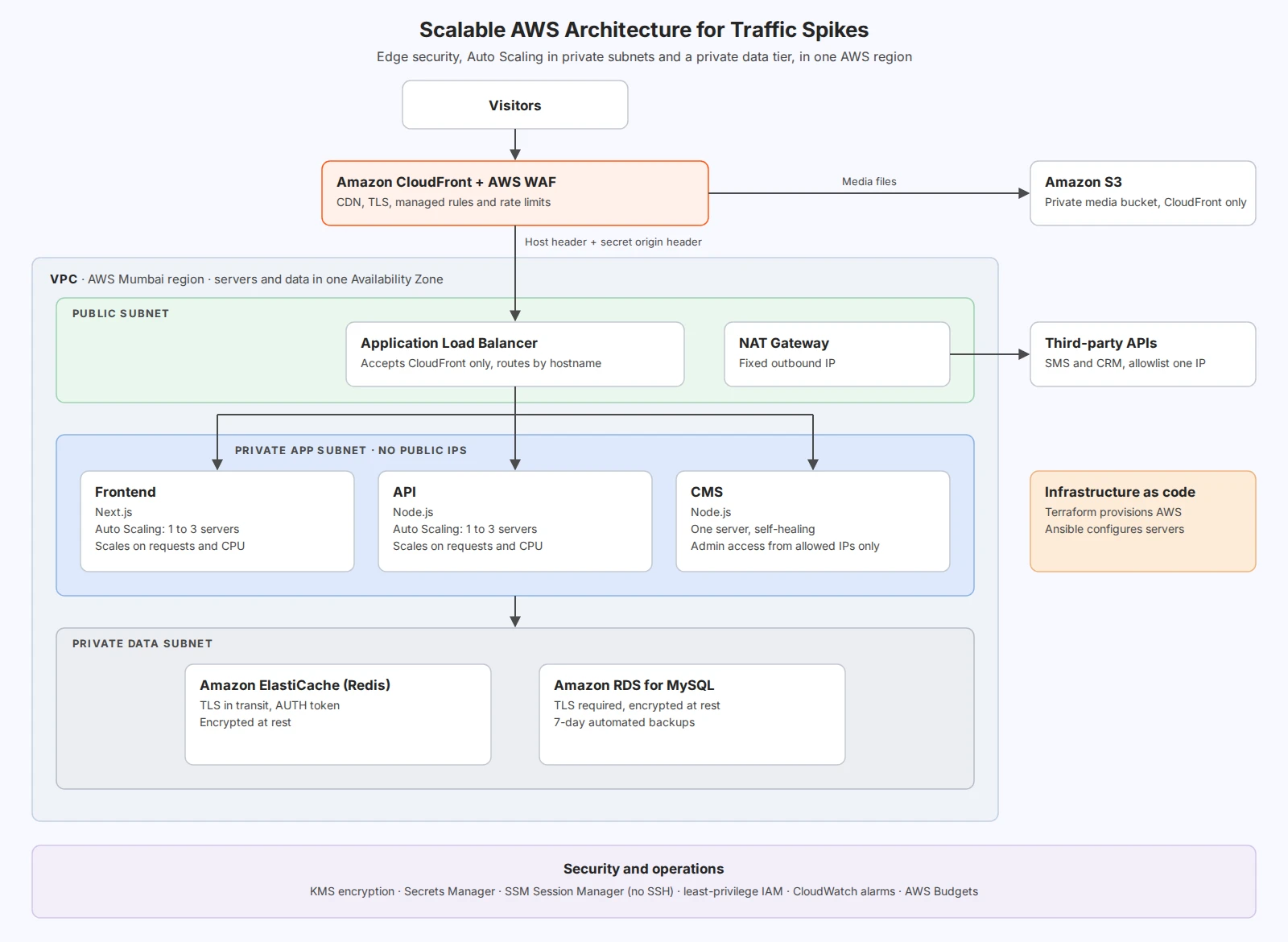
Visitors reach the platform through Amazon CloudFront. Static assets and media are served straight from the edge, and only requests that need a server travel on to an Application Load Balancer. The load balancer sends each request to the right application: a Next.js frontend, a Node.js API or a Node.js CMS. Those servers live in a private subnet, and the database and cache sit in a second private subnet behind them.
Edge security with CloudFront and AWS WAF
CloudFront does three jobs here. It terminates TLS close to the visitor, it caches everything that does not change per user (Next.js static files, optimised images, videos and media), and it is where AWS WAF inspects every request.
The WAF uses AWS managed rule groups against common attacks, a per-IP rate limit to slow down abusive clients, and an IP allowlist so the CMS admin can only be opened from approved office addresses. Media files live in a private S3 bucket that only CloudFront can read, using origin access control, so nobody can fetch files directly from S3.
The more CloudFront serves from its cache, the less work reaches the servers. During a spike, most of the extra load is absorbed at the edge before it ever touches the VPC.
A load balancer that only trusts CloudFront
A common gap in AWS setups is a load balancer that is publicly reachable, which lets attackers skip CloudFront and the WAF entirely. I close that gap in two ways:
- The load balancer’s security group only accepts traffic from CloudFront.
- CloudFront adds a secret header to every request it forwards, and the load balancer rejects any request without it. AWS documents this pattern in restricting access to Application Load Balancers.
The load balancer then routes by hostname. The frontend, API and CMS each have their own hostname, which keeps routing simple even when the applications use overlapping URL paths.
AWS Auto Scaling for traffic spikes
This is the heart of a scalable AWS architecture. The frontend and the API each run in their own Auto Scaling group: one server during normal hours, growing to three when load rises, then shrinking back. The CMS runs as a single server in a group that replaces it automatically if it fails.
Scaling uses two signals together:
- Request count per server, taken from the load balancer every minute. It reacts faster than CPU, which EC2 reports every five minutes by default.
- CPU utilisation, as a safety net for heavy requests.
Reactive scaling is not enough on its own, because a new server takes time to start. Two things solve that:
- Scheduled scaling: before a known campaign push, the minimum number of servers is raised in advance and lowered again afterwards.
- A pre-built base image: servers start from an image that already contains the runtime and dependencies, so a new server is serving traffic in about a minute to a minute and a half, instead of around five minutes on a plain operating system image.
One more lesson worth sharing: check your EC2 vCPU quota before you need it. A fully scaled stack can hit the default account limit, and the quota increase is not instant. I ask for headroom well before the first campaign.
I also tune the health checks so that a busy but healthy server is not replaced in the middle of a spike. A server has to fail several checks in a row before Auto Scaling treats it as unhealthy.
A private data tier: RDS and ElastiCache
The data layer sits in its own private subnet that only the application servers can reach:
- Amazon RDS for MySQL: encrypted at rest with AWS KMS, TLS required for every connection, seven days of automated backups with point-in-time recovery, and deletion protection.
- Amazon ElastiCache (Redis): encrypted in transit and at rest, with an AUTH token stored in AWS Secrets Manager.
Caching frequently read data in Redis keeps the database calm during spikes, which matters more than adding database capacity.
AWS security without SSH
For a financial services workload, security is built into every layer rather than added at the end:
- No SSH anywhere. Port 22 is closed on every server. Access goes through AWS Systems Manager Session Manager, which is logged and needs no keys on laptops.
- Least-privilege security groups: each component accepts traffic only from the component in front of it.
- Secrets in AWS Secrets Manager, never in source code or configuration files.
- Encryption at rest for disks, the database, the cache and media, all with AWS KMS.
- IMDSv2 only on every server, which blocks a whole class of credential-theft attacks.
- A fixed outbound IP: a NAT gateway gives all outbound calls, such as SMS and CRM integrations, one Elastic IP address that third parties can allowlist.
Single Availability Zone vs Multi-AZ
This is the trade-off I get asked about most. The application servers, database and cache all run in one Availability Zone. AWS requires the load balancer and the database subnet group to span two zones, so a second zone exists, but no servers or data run there.
“AWS is reliable” is not a good enough reason on its own, so here is the actual reasoning.
What actually goes wrong, and what handles it
Most production incidents are not data centre failures. They are a server that crashes or runs out of memory, a bad release, a sudden traffic spike, or a burst of malicious requests. Every one of those is handled inside a single zone:
- A failed server is caught by the load balancer health checks and replaced by Auto Scaling.
- A bad release is rolled back, because the previous release is always kept.
- A traffic spike is absorbed by the CloudFront cache and by Auto Scaling.
- An attack is filtered by AWS WAF before it reaches the servers.
A second zone protects against only one additional failure: the loss of an entire zone. AWS builds each zone as one or more physically separate data centres with their own power, cooling and networking, precisely so that a problem in one does not spread to another. A full zone outage is the rarest failure on this list.
Losing the zone means downtime, not lost data
The real question is what that rare event would cost. In this design the answer is a period of downtime, not a loss of data:
- Database backups and transaction logs are stored by RDS in Amazon S3, which keeps data across multiple zones in the region. The database can be restored to a point in time within about five minutes of the failure.
- Media files already live in S3, so they are unaffected by the loss of one zone.
- Application servers hold no data. They are built from the base image and the current release, both stored outside the zone.
- The infrastructure is code, so nothing has to be rebuilt from memory.
The recovery path is already in place
Because the load balancer and the database subnet group already span two zones, the second zone is wired in from day one. Recovering there means restoring the database from its latest backup into the second zone and pointing the Auto Scaling groups at it, a change made through Terraform. The risk is not “the platform is gone”; it is a bounded period of downtime with a known way back.
“What if it happens during a campaign?”
That is the fair counter-argument: the hours that matter most are exactly when an outage would hurt most. The answer is that Multi-AZ is a switch in this design, not a rebuild. For a high-stakes window, RDS can be converted to Multi-AZ without downtime, and the Auto Scaling groups can be spread across both zones, then scaled back afterwards. So the business does not have to pay for a standby every hour of every month to be protected during the few hours that need it.
When I would not choose a single zone
If downtime directly loses money or breaches a regulatory commitment, as it would for payments, trading or core banking systems, I start with Multi-AZ from day one. The question to ask is not “is a single zone safe?” but “what would an hour of downtime cost, compared with paying for standby capacity all year?” For this platform the answer favoured one zone; for many financial workloads it will not, and the same design covers both.
Keeping AWS costs predictable
Spiky traffic means the AWS bill can spike too. A few habits keep it under control:
- Data transfer is the main variable cost, so caching at CloudFront and optimising images and video matter as much as server sizing.
- AWS Budgets sends alerts at set thresholds and on the forecast, so an unusual month is visible early.
- Scale back down: every scheduled scale-up is paired with a scale-down, so extra servers never linger after a campaign.
- Right-size first, then scale out: small burstable instances during normal hours, and more of them only when the traffic is really there.
If you are earlier in your AWS journey and do not need Auto Scaling yet, a simpler starting point is often better. I explain when that is the case in why I prefer AWS Lightsail for small businesses.
How it is built and run
The whole environment is defined as code. Terraform provisions the AWS infrastructure: the network, load balancer, Auto Scaling groups, database, cache, CloudFront, WAF, alarms and budgets. Ansible handles configuration management, setting up each server and deploying the applications on it. New servers configure themselves when they start, so a replacement launched by Auto Scaling comes up with the current release automatically.
Because everything is in code, a second environment for testing is an exact copy of production, and any change is reviewed before it reaches AWS. For a deeper look at an automated delivery pipeline, see how I built a CI/CD pipeline on AWS EKS.
Frequently asked questions
What is a scalable AWS architecture?
A scalable AWS architecture is a setup that adds capacity automatically when traffic rises and removes it when traffic falls, without slowing down or failing. In practice that means a CDN such as CloudFront in front, stateless application servers in Auto Scaling groups behind a load balancer, and a managed database and cache that the servers share.
How do you handle traffic spikes on AWS?
Combine three things. Cache everything you can at CloudFront so most of the spike never reaches the servers. Let Auto Scaling add servers based on request count and CPU. And for spikes you can predict, such as a campaign launch, raise the minimum number of servers in advance with scheduled scaling, because new servers take a minute or more to start.
How many concurrent users can this AWS architecture handle?
The setup comfortably handles 3,000 to 4,000 concurrent users. Beyond that, Auto Scaling adds frontend and API servers automatically, and the CloudFront cache absorbs much of the extra load before it reaches the servers.
Is a single Availability Zone safe for a financial services workload?
For the right workload, yes. The everyday failures (a crashed server, a bad release, a traffic spike, an attack) are all handled inside one zone. Losing a whole zone is rare, and in this design it would mean downtime rather than lost data, because backups and media are stored in S3 across multiple zones and the second zone is already wired in for recovery. For systems where any downtime is unacceptable, such as payments or trading, use Multi-AZ from the start.
Why use a CloudFront secret header if the load balancer is already restricted?
Restricting the security group to CloudFront still allows any CloudFront distribution to reach the load balancer, including one set up by someone else. The secret header proves the request came from your own distribution, so the WAF can never be bypassed.
Do I need Terraform and Ansible for a setup like this?
You can build it by hand in the console, but code makes it repeatable. Terraform recreates the infrastructure exactly, and Ansible keeps every server configured the same way, which matters when Auto Scaling is adding and removing servers for you.
Conclusion
A scalable AWS architecture is less about using many services and more about putting each one where it does the most good: CloudFront and WAF at the edge, a load balancer that only trusts CloudFront, Auto Scaling where the load actually lands, and data kept private and encrypted. Add scheduled scaling for the spikes you can predict, fast-starting servers for the ones you cannot, and cost alerts for peace of mind, and the platform stays fast, secure and affordable.
If you are planning something similar, my cloud infrastructure services are built for exactly this kind of design.